
Open eBooks Hybrid Mobile Apps, 2024
Built an accessible e-reading experience for students in Title 1 schools
Role: Technical Team Lead, Frontend
Company: New York Public Library
Timeline: 2023-2024
Scale: National program serving students across Title 1 schools; 37,000+ checkouts in Q1 2024
Team: Led 3 frontend engineers building TypeScript/React layer; collaborated with 2 mobile engineers (Swift/Kotlin), UX designer, accessibility specialist, and QA
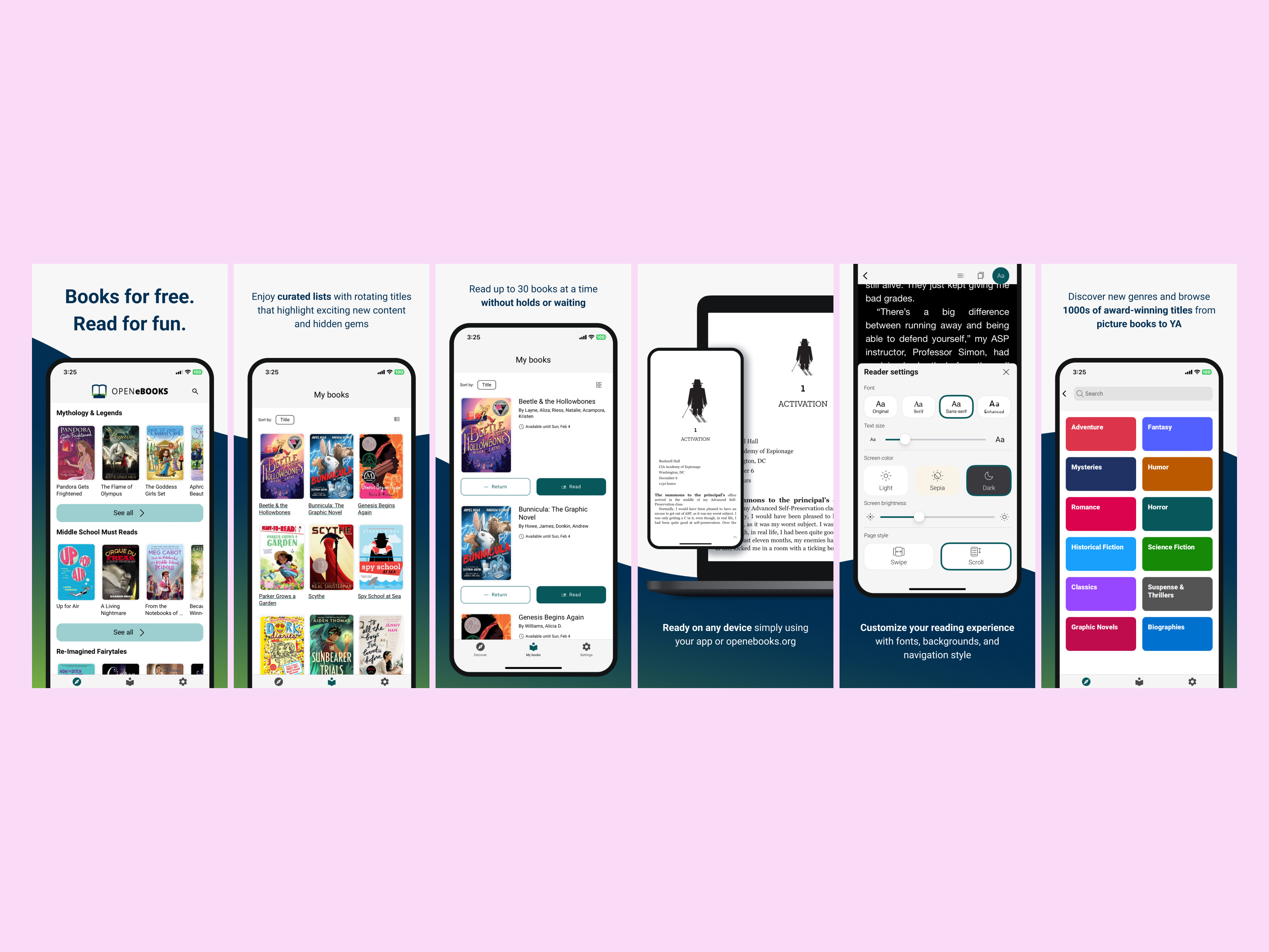
The Problem #
Open eBooks, a Michelle Obama-era initiative, provided free ebooks to students in Title 1 schools nationwide through a web application. However, the web-only experience had limitations:
- Students preferred native mobile reading experiences
- Offline reading wasn't reliable
- The web app couldn't leverage platform-specific accessibility features
- Users wanted a more polished, app-like experience
Challenge: Rebuild the entire frontend as a hybrid iOS/Android app while maintaining the existing backend, keeping accessibility as a top priority, and coordinating between web and native code.
The Hybrid Approach #
I led the technical architecture for a hybrid app split into two layers:
TypeScript/React layer: User authentication, book browsing, search, catalog navigation, and download management
Native layer: The actual reading experience (Swift for iOS, Kotlin for Android), including reader settings, bookmarks, and position tracking
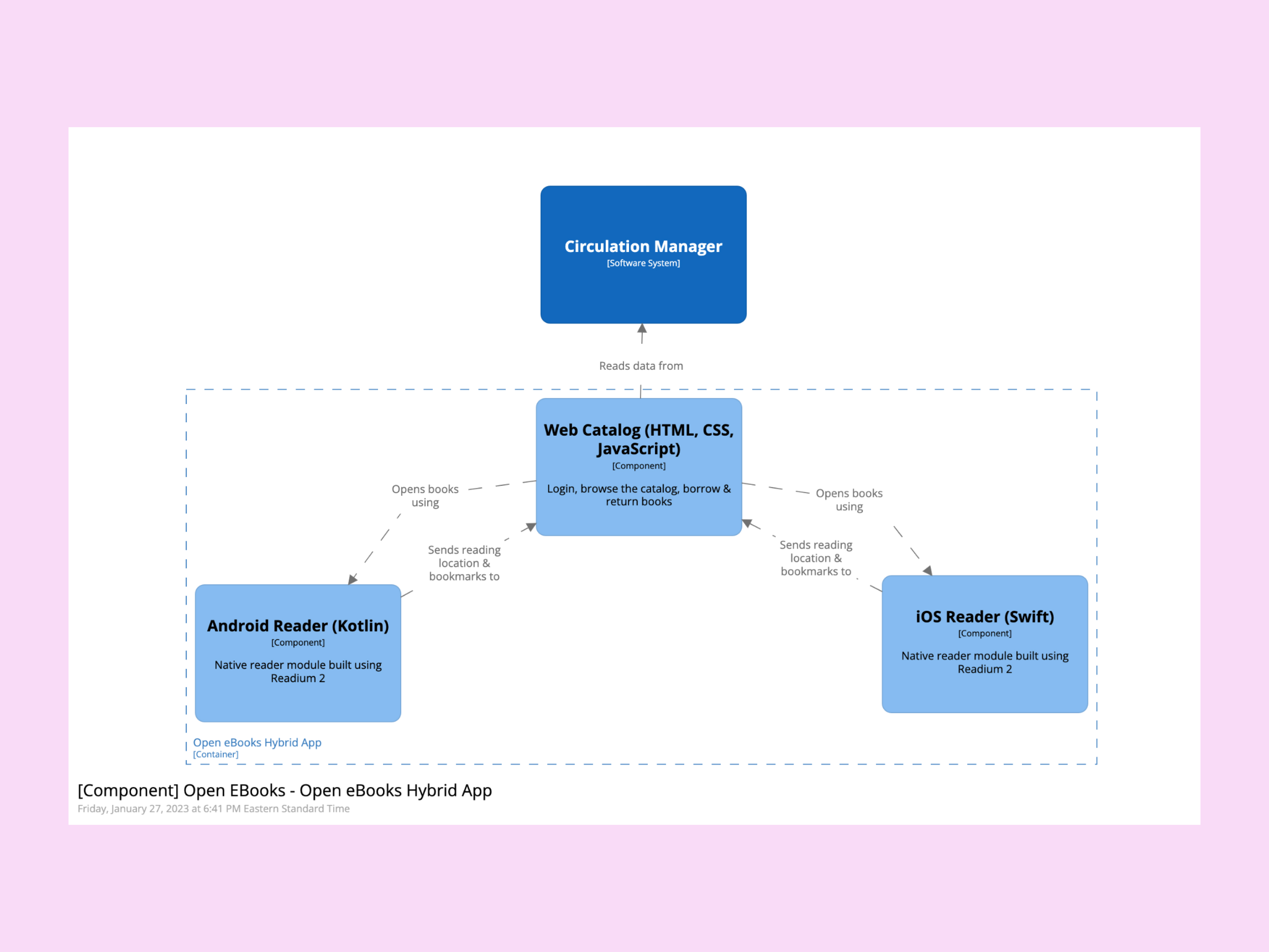
C4 Component Diagram of the app architecture
The Technical Challenge: Communicating Between TypeScript and Swift/Kotlin #
The most complex aspect was designing a clean API for communication between layers. I created a custom Capacitor plugin that handled multiple publication types (EPUB, audiobooks) while maintaining type safety across the TypeScript/native boundary.
The plugin used event-driven communication—native readers would emit events (bookmark changes, position updates, state transitions) back to TypeScript. I kept the data passing minimal: TypeScript would open a book with initial state, then native would take over completely and only send back critical updates.
This architecture enabled shared TypeScript types and business logic across web and hybrid apps via a monorepo, while letting each platform optimize its reading experience.
Design & Accessibility Process #
Component-First Design Strategy #
I worked closely with our UX designer and accessibility specialist to establish an efficient, accessibility-first workflow. Before any design mocks were created, we reviewed Capacitor components and Chakra UI's built-in accessibility features together. This upfront evaluation allowed the designer to theme and extend existing components rather than creating custom designs, significantly speeding up implementation.
Our accessibility specialist audited the component library for WCAG compliance and documented which components needed modifications. This prevented us from building on an inaccessible foundation.
Three-Phase Accessibility Testing #
Upfront component audit: Accessibility specialist evaluated Capacitor/Chakra components before design began, creating team guidelines
Development integration: Engineers used automated testing (axe-core, Lighthouse) in CI, plus manual keyboard navigation and screen reader testing (VoiceOver, TalkBack)
Expert review: Accessibility specialist tested complete user flows with assistive technologies, focusing on edge cases and cross-platform consistency
This process ensured WCAG 2.2 AA compliance from the start rather than retrofitting accessibility later.
Impact #
Successfully launched iOS and Android apps with WCAG 2.2 AA accessibility compliance for a national program serving students in Title 1 schools across the United States.
Usage impact:
- Q1 2024: 37,335 checkouts (55% increase year-over-year)
- 43% of checkouts came from hybrid mobile apps, demonstrating strong mobile adoption
Despite this growth trajectory, Open eBooks was strategically sunset in 2025 as NYPL refocused resources.
Tech Stack #
Frontend: React, TypeScript, Next.js, Chakra UI, Capacitor (hybrid framework)
Mobile: Swift (iOS), Kotlin (Android)
Testing: Playwright (end-to-end), Jest (unit tests), axe-core, Lighthouse (accessibility)
Infrastructure: Monorepo with shared TypeScript types and utilities, GitHub Actions (CI/CD), Appflow (app store deployment)